
How To Set Search Engine Visibility In WordPress
WordPress makes it easy to control whether search engines can index your site. This setting, known as Search Engine Visibility, can significantly impact your traffic and rankings.
In this article, we’ll walk you through where to find the setting, why you might enable or disable it, and the SEO implications of misusing it.
What Is the Search Engine Visibility Setting in WordPress?
Inside your WordPress dashboard, there’s a simple checkbox that tells search engines whether they should index your site.

- Enabled (box checked): WordPress asks search engines not to index your site.
- Disabled (box unchecked): Your site is open for indexing and can appear in Google, Bing, and other search engines.
It’s important to understand that this setting doesn’t guarantee blocking or indexing; it simply sends a request via the robots.txt file. Search engines usually respect it, but it’s not an absolute barrier.
Where to Find Search Engine Visibility in WordPress
- Log in to your WordPress Admin Dashboard.
- Go to Settings > Reading.
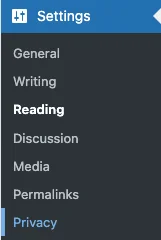
- Scroll down to the section labeled Search Engine Visibility.
- You’ll see the option:
- “Discourage search engines from indexing this site.”
- A checkbox controls this setting.

- Click Save Changes after updating.
Why You Might Enable Search Engine Visibility (Discourage Indexing)
There are a few valid scenarios where you don’t want your site indexed:
1. During Development or Redesign
If your site is under construction, you probably don’t want half-finished pages showing up in search results.
2. Internal or Private Use
Some WordPress sites are meant for internal company documentation, training, or client projects; no need to expose them publicly.
3. Staging or Testing Sites
Staging environments should never compete with your live production site in search rankings.
Why You Shouldn’t Leave It Enabled on a Live Site
It’s surprisingly common for businesses to launch a site and forget to uncheck this setting. The results can be disastrous:
- Your site won’t rank in Google (or it will rank poorly, if at all).
- Organic traffic will flatline because search engines can’t crawl your content.
- SEO work goes to waste; no matter how good your content or backlinks are, they won’t help if search engines are blocked.
How This Affects SEO
- Short-Term Use (Safe): Blocking indexing during development or staging is acceptable, as long as you disable it before launch.
- Long-Term Use (Harmful): Leaving it on for months (or years) means search engines may never index your site correctly. Even after you disable it, it can take time to recover.
Tip: After launching, always double-check this setting and use Google Search Console to verify your site is being indexed.
Alternatives to Search Engine Visibility
If you want more precise control, consider using:
- Noindex Tags: Plugins like Yoast SEO or Rank Math (A Dorky Duck Favorite!) let you apply
noindexto specific pages (example: thank-you pages or duplicate content). - Password Protection: For private content, use WordPress’s built-in password protection or membership plugins.
- Robots.txt Rules: Customize which parts of your site should or shouldn’t be crawled.
Best Practices
- Always disable “Discourage search engines” before going live.
- Use staging sites for testing so your live site can stay indexable.
- Run periodic audits with tools like Ahrefs, SEMrush, or Google Search Console to ensure your site is visible.
- Educate your team; many site owners don’t even know this setting exists until it’s too late.
Final Thoughts
The Search Engine Visibility setting in WordPress is a powerful tool, but also one of the easiest to misuse. It’s perfect for keeping staging or private sites out of search results, but it should never stay on for a live, public-facing website.
Before you launch, double-check this setting. It could mean the difference between ranking on page one of Google or being invisible altogether.
That is today’s Ducky Journal Entry. We hope it’s helpful.
Comments are closed.