
What Are Image Alt Text, Captions, And Descriptions In WordPress?
Images are one of the most potent elements of a website. They grab attention, tell stories, and support your content visually. But behind the scenes, WordPress gives you a few fields to add extra information about your images: Alt Text, Captions, and Descriptions.
These may seem optional, but they play a significant role in SEO, accessibility, and user experience. In this guide, we’ll break down what each of these fields means, why they’re essential, and when you should use them.
The Three Key Image Fields in WordPress
When you upload an image in WordPress, you’ll see several fields you can fill in:
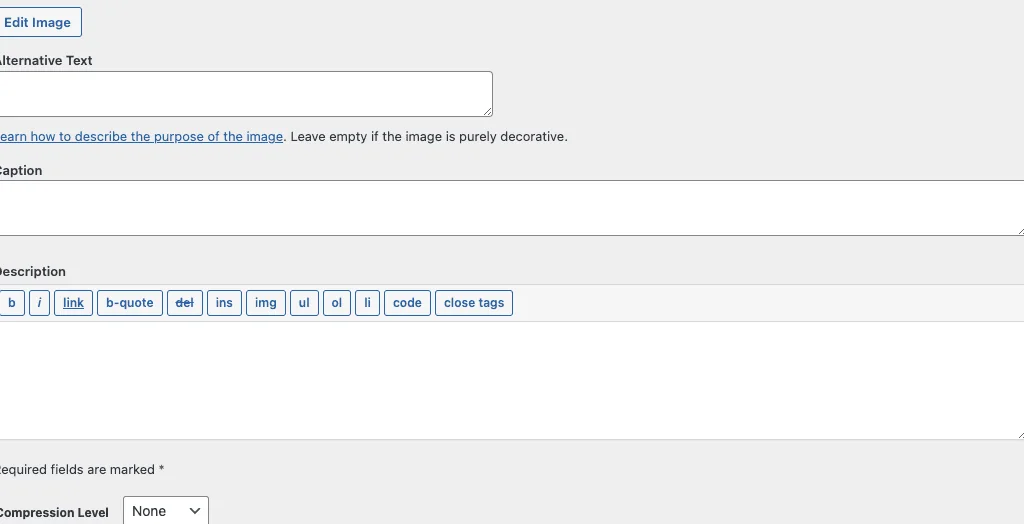
1. Alt Text (Alternative Text)
- What it is: Text that describes the image’s content and purpose.
- Where it’s used:
- Screen readers read it aloud for visually impaired users.
- Search engines use it to understand the image context.
- It shows up if the image fails to load.
- Best practice: Be descriptive and concise. For example:
- ❌ “Image123”
- ✅ “Small business owner using a laptop to manage finances”
2. Captions
- What it is: A short piece of text that appears directly below an image on a page or post.
- Where it’s used:
- Provides context for readers.
- Useful for photos, charts, or screenshots that need clarification.
- Best practice: Keep it brief and explanatory. Example:
- “Dorky Duck team presenting at the Austin Tech Conference, 2025.”
3. Description
- What it is: A longer explanation of the image, stored in the WordPress media library.
- Where it’s used:
- Rarely displayed on the front end by default.
- Can be used by some themes or plugins (like galleries or lightboxes).
- Helpful for internal reference when managing a large media library.
- Best practice: Use it when you need extra details for backend organization or galleries.
Why Alt Text, Captions, and Descriptions Are Important
1. Accessibility
Alt text ensures that visually impaired users can understand your images via screen readers. This isn’t just good practice, it’s an essential step toward making your site inclusive and ADA-compliant.
2. SEO Benefits
- Search engines can’t “see” images. They rely on alt text and context to index them.
- Optimized alt text increases your chances of showing up in Google Images search, driving extra traffic.
- Captions and descriptions can also add relevant keywords and context around images.
3. User Experience
- Captions help clarify complex visuals like charts or infographics.
- Alt text ensures users still understand the content if an image doesn’t load.
- Descriptions make it easier for you (or your team) to manage media files in WordPress.
4. Professionalism
A site with broken, unlabeled images looks sloppy. Filling in these fields shows attention to detail and creates a more polished user experience.
When You Should Use Each
- Alt Text: Always. Every image that conveys meaning should have alt text. (Exceptions: decorative images where alt text is unnecessary, in those cases, leave it empty, not filled with random words.)
- Captions: Use when an image benefits from extra context; for example, event photos, charts, or anything that needs explanation. Skip them if they clutter the design.
- Description: Use internally to keep track of media library details, or externally if your theme/plugin supports image descriptions.
Common Mistakes to Avoid
- Keyword Stuffing: Avoid forcing SEO keywords into alt text in an unnatural way. Focus on describing the image.
- Generic Labels: Avoid “photo,” “image,” or file names like “IMG_1234.”
- Overusing Captions: Not every image needs a caption: use them strategically.
- Neglecting Alt Text: Decorative images don’t need it, but meaningful ones always should have it.
Final Thoughts
Alt text, captions, and descriptions may feel like small details, but together they enhance your site’s SEO, accessibility, and professionalism.
- Use Alt Text for accessibility and SEO.
- Add Captions when an image needs context.
- Include Descriptions for backend organization or galleries.
By taking a few extra seconds to fill these in when uploading images, you’ll make your WordPress site more discoverable, more inclusive, and more user-friendly.
That is today’s Ducky Journal Entry. We hope it’s helpful.
Comments are closed.