
What Is A WordPress Theme?
If you’ve ever browsed WordPress, you’ve likely come across the term “theme.” But what exactly is a WordPress theme, and why is it so important? Whether you’re launching your first website or redesigning an existing one, understanding themes is critical to building a site that looks professional, functions smoothly, and aligns with your brand.
In this article, we’ll cover what a WordPress theme is, how to choose one, ways to customize it, why you should always keep at least two installed, and why themes matter so much.
What Is a WordPress Theme?
A WordPress theme is a collection of files and templates that control how your website looks and feels. It dictates:
- Layout (headers, footers, sidebars, navigation)
- Fonts, colors, and typography
- Page templates and styling
- Responsive design for mobile and tablet devices
Think of it as your site’s design skin; it doesn’t change your content (posts, pages, images), but it changes how that content is displayed.
Where to Choose a WordPress Theme
You can select and install themes directly from your WordPress dashboard:
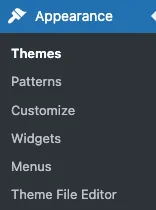
- Go to Appearance > Themes.
- Click Add New to browse available options.
- Choose from:
- Free Themes: Found in the official WordPress.org Theme Directory. These are reviewed for quality and security.
- Premium Themes: Available from marketplaces like ThemeForest, Elegant Themes, or developers’ websites. These often include advanced features and support.
- Custom-Built Themes: Designed specifically for your business by a developer for a unique look.
When selecting a theme, consider:
- Responsiveness (mobile-friendly design is a must).
- Speed and performance.
- Compatibility with your plugins.
- Regular updates and developer support.
- Design that matches your brand and goals.
How to Customize a WordPress Theme
After activating a theme, you can make it your own in several ways:
1. WordPress Customizer
Go to Appearance > Customize. From here, you can adjust:
- Site identity (logo, site title, tagline)
- Colors and fonts
- Header and footer layouts
- Menu placement
- Widgets
2. Theme Settings Panel
Some premium themes come with their own settings dashboards, offering more granular control over design and layout.
3. Page Builders
Plugins like Elementor, Beaver Builder, or Divi Builder let you visually design pages without touching code.
4. Child Themes
If you plan on editing theme code (CSS, PHP), always create a child theme. This ensures your changes aren’t overwritten when the main theme updates.
Why You Should Have at Least Two Themes Installed
Many site owners don’t realize it, but WordPress requires a backup theme; typically, a default WordPress theme like Twenty Twenty-Five, for safety and troubleshooting.
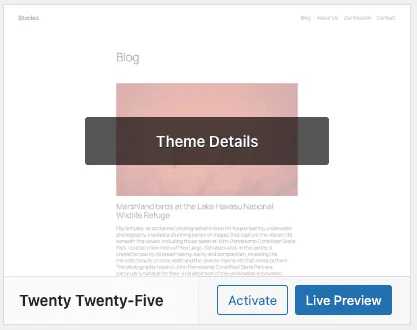
Here’s why:
- Fallback Option: If your active theme breaks due to a bad update or conflict, WordPress can fall back to the secondary theme.
- Troubleshooting: Switching to a default theme helps you test whether issues are theme-related or plugin/server-related.
- Core Updates: WordPress updates are tested against default themes. Having one installed ensures compatibility.
- Security: In case of vulnerabilities in your primary theme, a fallback prevents your site from going offline completely.
Why Themes Are Important
1. Branding and First Impressions
Your theme controls the visual identity of your site. A professional theme builds trust, while a poorly designed one drives visitors away.
2. User Experience
Themes influence navigation, readability, and overall usability; all critical factors in keeping visitors engaged.
3. SEO and Performance
Well-coded themes follow best practices for speed, responsive design, and structured data, all of which impact search rankings.
4. Flexibility and Scalability
A good theme allows you to grow your site without constantly changing designs.
5. Security and Stability
Trusted, well-maintained themes reduce risks of vulnerabilities that could compromise your site.
Final Thoughts
Your WordPress theme isn’t just a design choice; it’s the backbone of your site’s look, usability, and performance. Choose a theme that matches your goals, customize it to reflect your brand, and always keep at least one extra (like a default WordPress theme) installed as a fallback.
By treating your theme as more than just a design layer, you’ll set your site up for long-term success in terms of SEO, security, and user experience.
That is today’s Ducky Journal Entry. We hope it’s helpful.
Comments are closed.