
How And When To Update Your WordPress Permalink Structure
Permalinks, the permanent URLs of your WordPress posts and pages, may not be something you think about every day. But they’re one of the most critical technical and SEO considerations for your site. Updating your permalink structure at the right time (and in the right way) can improve user experience, boost search rankings, and future-proof your content strategy.
In this article, we’ll cover why you might update your permalinks, how to do it safely, and what SEO impacts to expect.
What Are WordPress Permalinks?
A permalink is the full URL that points to a blog post, page, or other content on your site.
For example:
- Default:
https://dorkyduck.com/?p=123 - SEO-Friendly:
https://dorkyduck.com/blog/how-to-update-permalinks
WordPress gives you multiple options for structuring these links, from simple numeric IDs to descriptive slugs with keywords.
Why You Should Update Your Permalink Structure
1. Improve SEO Performance
Search engines prefer URLs that are descriptive, keyword-rich, and easy to read. A URL like /best-laptops-2025/ tells both users and Google what the page is about.
2. Enhance User Experience
Visitors are more likely to click and trust clean, human-readable links rather than strings of random numbers or parameters.
3. Content Strategy Alignment
As your site grows, your initial permalink choices may no longer be suitable. For example, if your URLs include dates (like /2023/12/post-title), but you want your content to be evergreen, removing the date can help.
4. Branding and Professionalism
A well-structured URL makes your site look polished and professional. For businesses, this small detail can have a significant impact on trust.
When to Update Your Permalinks
- Right After Launch: The best time to choose a solid permalink structure is before you publish much content.
- During a Redesign or Rebrand: If you’re overhauling your site’s design or reorganizing categories, it’s a good opportunity to review your URL strategy.
- When Moving Away From Outdated Formats: If you’re still using the default
?p=123style or have date-based URLs that don’t serve your strategy, it may be time to switch.
Pro Tip: Avoid frequent changes. Each update risks breaking links and confusing search engines.
How to Update Your WordPress Permalink Structure
- Backup Your Site
Always take a full backup before making URL changes. This ensures you can roll back if anything breaks. - Go to WordPress Settings
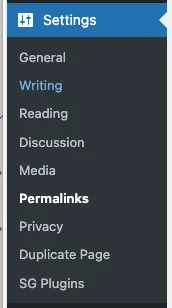
- Navigate to Settings > Permalinks in your WordPress dashboard.
- Choose a structure that fits your needs. Popular choices include:
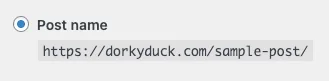
/post-name/(clean and SEO-friendly)

/category/post-name/(good for large blogs)

- Save Changes
WordPress will automatically update your.htaccessfile to reflect the new structure. - Set Up 301 Redirects
To avoid broken links and SEO losses, redirect old URLs to the new format using a plugin like Redirection, or set up rules in your.htaccessfile. - Update Internal Links
While WordPress updates most automatically, review menus, widgets, and hard-coded links. - Resubmit Your Sitemap
Update your sitemap in Google Search Console and Bing Webmaster Tools so search engines crawl the new structure quickly.
How Changing Permalinks Affects SEO
Positive Effects
- Cleaner, keyword-focused URLs can improve rankings.
- Removing unnecessary elements (like dates) can help evergreen content perform better.
Risks
- Broken links if redirects aren’t set up correctly.
- Temporary traffic dips as search engines adjust to the new structure.
Mitigation Tips
- Use 301 redirects religiously.
- Monitor your Google Search Console for crawl errors.
- Don’t make unnecessary changes; only update when it’s genuinely beneficial.
Final Thoughts
Your WordPress permalink structure isn’t just a technical setting; it’s a core part of your site’s SEO and user experience. If you’re launching a new site, choose a clean format such as /post-name/ from the start. If you’re considering a change on an existing site, weigh the SEO risks against the long-term benefits, and make sure to handle redirects properly.
Handled correctly, updating your permalinks can give your site a boost in search visibility and make your content more accessible to users.
That is today's Ducky Journal Entry. We hope it's helpful.
Tags: How-To, Permalinks, SEO, WordPress
Comments are closed.